


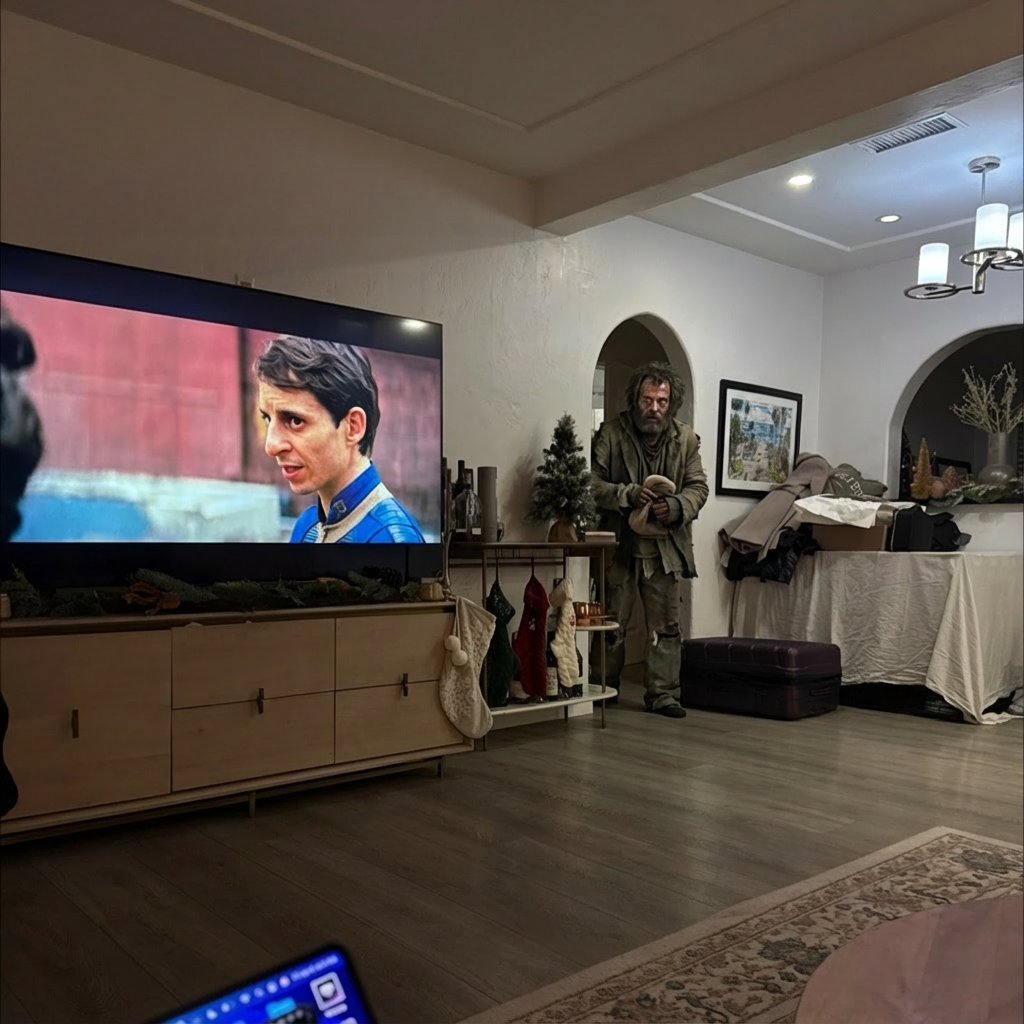
Example results generated with Gluely
AI Face Swap — Realistic Face Swaps in Seconds
Swap faces in any photo with AI. Realistic, seamless face swapping powered by AI. Swap with celebrities, friends, or AI characters. Free on iOS.
76+
AI Styles
4.8
App Store
Free
To Start
Free on iOS · No account needed
About AI Face Swap
Cheap face swap apps paste your face onto a photo and call it done. The lighting doesn't match, the skin tone is off, and everyone can tell it's fake. Gluely's face swap AI actually reconstructs the target image with your facial features — matching skin tone, shadow direction, and even the grain of the original photo.
The technology works in two stages. First, it maps 68 facial landmarks on your photo to understand the geometry of your face. Then it regenerates the target image, blending your features into the scene while preserving the original lighting and composition. The result looks like you were actually there when the photo was taken.
You can save multiple faces to your account with My Faces and swap into any of the 76+ styles, 28 AI characters, or 15 prank templates. One face photo, unlimited swaps.
Key Features
68-point facial landmark mapping
The AI identifies 68 points on your face — jawline, eyes, nose, mouth — to understand your unique facial geometry. This precision is what makes the swap look natural instead of pasted-on.
Automatic lighting and skin tone matching
The AI analyzes the lighting direction, color temperature, and skin tone in the target photo, then adjusts your face to match. If the target has warm golden-hour light, your swapped face will too.
My Faces — save once, swap everywhere
Upload your face photo once and it's stored in your account. Use it across any style, character, or prank. No re-uploading, no re-processing. Works with AI characters, pranks, and all 76+ styles.
Works with AI characters and pranks
Face swap isn't just for existing photos. Combine it with Gluely's 28 AI character presets or 15 prank templates. See yourself as an anime protagonist, a GTA character, or in a hilarious prank scene.
Use Cases
Prank your friends and family
Swap a friend's face into a mugshot, a homeless scene, or an embarrassing situation. Gluely's prank templates are designed for exactly this — realistic enough to fool them, funny enough to share.
Try different looks before committing
Wondering how you'd look with a new hairstyle, outfit, or aesthetic? Swap your face into AI-generated photos with different styles. Try old money, gym aesthetic, or bohemian without leaving your couch.
Create couple and group content
Swap both faces into matching AI character photos, create couples' anime portraits, or put your friend group into a movie scene. Popular for birthday posts, anniversary content, and TikTok trends.
Viral TikTok and Instagram content
Face swap reveal videos consistently get millions of views. Generate the swapped image in Gluely, then record a reaction video. The "before and after" format is proven to drive engagement.
How It Works
Upload Your Face
Take a selfie or upload a clear face photo. Save it to My Faces for quick reuse.
Choose a Target
Select an AI character, style, or upload a target photo for the swap.
AI Swaps Instantly
Our AI blends your face seamlessly with proper lighting and skin matching.
AI Face Swap Examples
Real results generated by Gluely users. Tap any style to try it.


Try AI Face Swap Free
Photorealistic results in seconds. No watermarks. Free credits to start.
Download on App StoreFree on iOS · No account required to start

Related AI Tools
AI Photo Editor
Edit photos with AI — face swap, background removal, upscaling, relighting, and ...
AI Image Generator
Generate photorealistic AI images from text prompts or photos. 76+ styles includ...
AI Avatar Generator
Create high-quality AI avatars from your photos. Anime, Pixar, 3D, realistic, an...
Frequently Asked Questions
How does AI face swap work?
Gluely's face swap maps 68 facial landmarks on your photo, then regenerates the target image with your features blended in. It matches skin tone, lighting direction, and facial angles — so the result looks like a real photo, not a cut-and-paste job.
Is AI face swap free?
Yes. Gluely includes free credits when you download — enough to try face swap across multiple styles. No subscription required. Premium plans add more credits for heavy use.
Can I swap faces with celebrities?
Gluely doesn't create deepfakes of real people. Instead, it offers 28 AI character presets — celebrity-style aesthetics like magazine covers, red carpet looks, and athlete portraits — that you can swap your face into. You get the vibe without the ethical concerns.
What makes Gluely's face swap more realistic?
Three things: 68-point facial mapping (not just a bounding box), automatic lighting/tone matching (your face matches the scene's light), and full image regeneration (the AI rebuilds the area around your face so edges blend naturally). Most apps skip steps 2 and 3.
Can I face swap with multiple people?
You can save multiple face photos in My Faces and use different ones for different generations. For group photos, apply a style to the whole image and the AI will transform all visible faces.
Download Gluely Free
Photorealistic results in seconds. No watermarks. Free credits to start.
Download on App StoreFree on iOS · No account required to start
Published by Gluely · Updated March 2026